---
title: Country Dropdown with Flag
description: "In this article, we will try to explain how to set up **Contact Form 7 Country Dropdown with Flag** Easily with the help of our Free Addon \"Country Dropdown Field\". ## **Watch Complete Video** If you need further guidance, watch our…"
url: "https://cf7addons.com/docs/free-addons/contact-form-7-country-dropdown-with-flag/"
updated: "2026-02-10"
category: Free Addons
---
# Country Dropdown with Flag
In this article, we will try to explain how to set up **Contact Form 7 Country Dropdown with Flag** Easily with the help of our Free Addon "Country Dropdown Field".
## **Watch Complete Video**
If you need further guidance, watch our video tutorial. It walks you through the entire process of creating a Contact Form 7 country list form step-by-step:
[How to Add Country Dropdown Field with Flags in Contact Form 7 | Step-by-Step Guide](https://www.youtube.com/embed/LENed7bbKhw?feature=oembed)
---
## What's needed
- Ensure that both [Contact Form 7](https://wordpress.org/plugins/contact-form-7/) and [Ultra Addons for Contact Form 7](https://wordpress.org/plugins/ultimate-addons-for-contact-form-7/) are installed on your WordPress site.
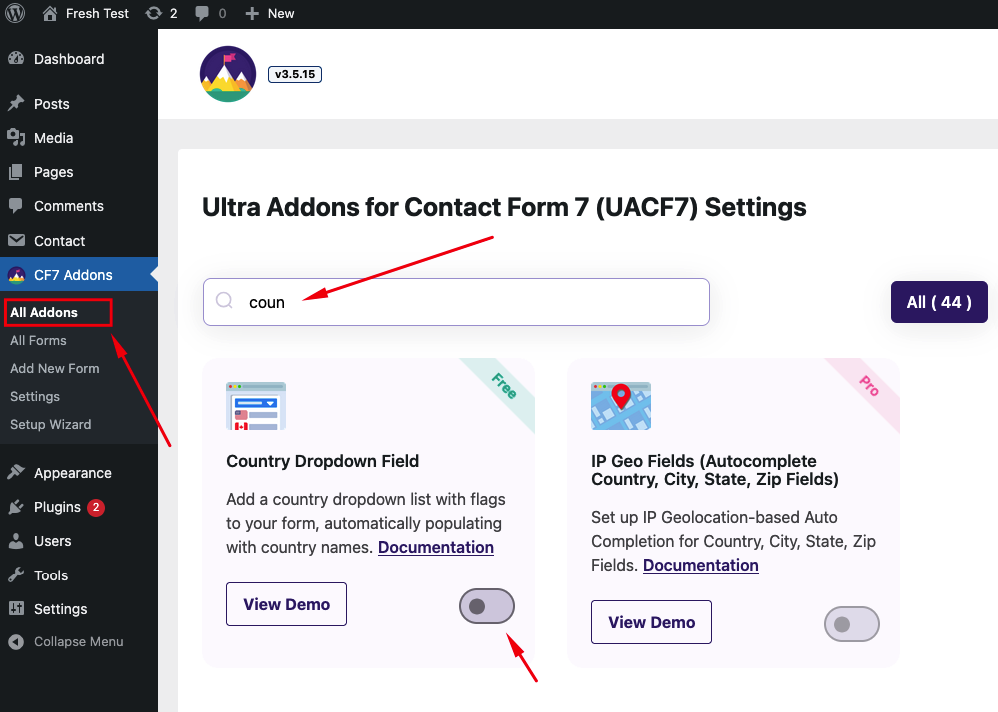
- Navigate to the **Ultra Addons section** in your WordPress Dashboard, and enable the "Country Dropdown Field" checkbox/toggle.
## What is Contact Form 7 Country Dropdown field?
The Contact Form 7 Country Dropdown Field is a feature that allows you to easily add a dropdown list of countries to your contact forms. This dropdown can be used to let users select their country from a predefined list, enhancing the user experience by providing a convenient way to enter location information.
## Live Example of a Country List Form
In this tutorial, we'll create a Contact Form 7 with a country dropdown, similar to the example below. Follow these steps to create your own form.
Visit our [main demo](https://cf7addons.com/preview/contact-form-7-country-dropdown/) to see all the supported fields for the Contact Form 7 Country Dropdown field.
## Creating a Contact Form 7 Country Dropdown with Flags
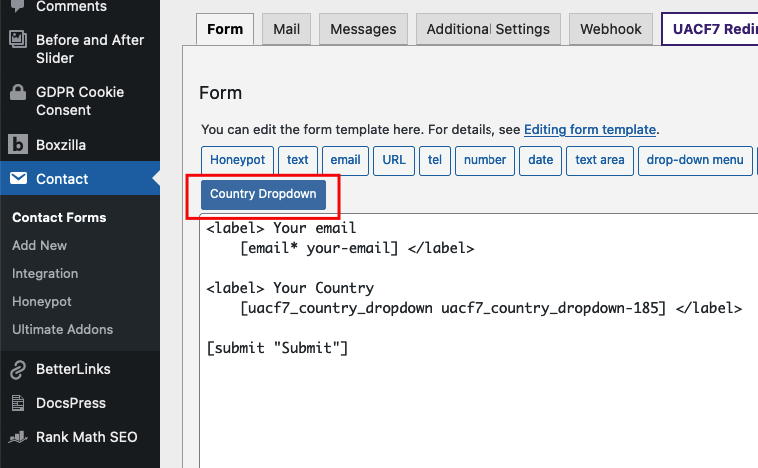
Go to **Contact** -> **Add New** in your WordPress Dashboard to create a new form. You will see a contact form editor with a "Country Dropdown" button.
### Choose your Country List
Click on the "Country Dropdown" button. This will give you options to add a list of countries to your contact form.
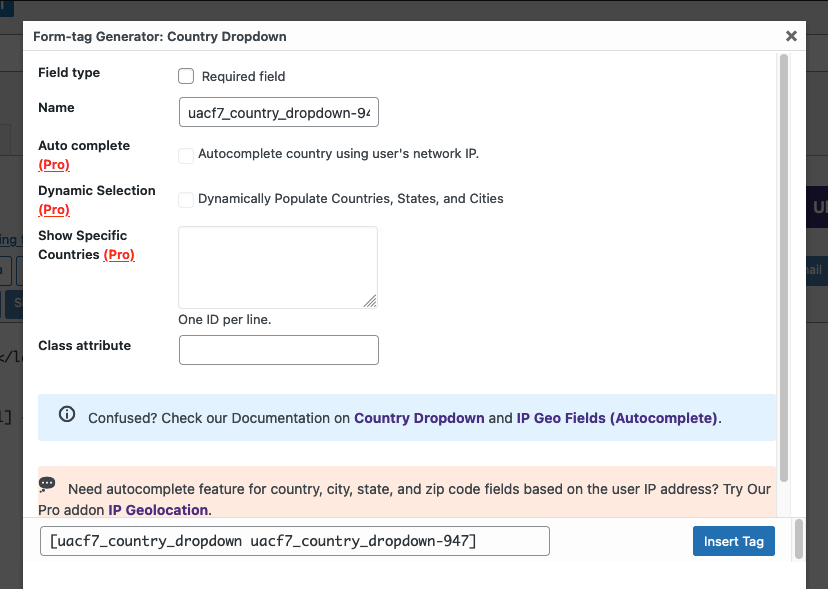
On the popup settings panel,** **you'll find the following options:
- **Field Type:** Decide if this dropdown should be a required field. Check the box if you want to make it required.
- **Name:** This field is auto-generated, but you can rename it to suit your needs.
- **Auto Complete, Only Countries, Default Country:** These are Pro features. If you upgrade, the system can automatically detect the user's location via IP and fill in the country name.
- **Class Attribute:** Add a custom class if needed.
### **Insert Tag**
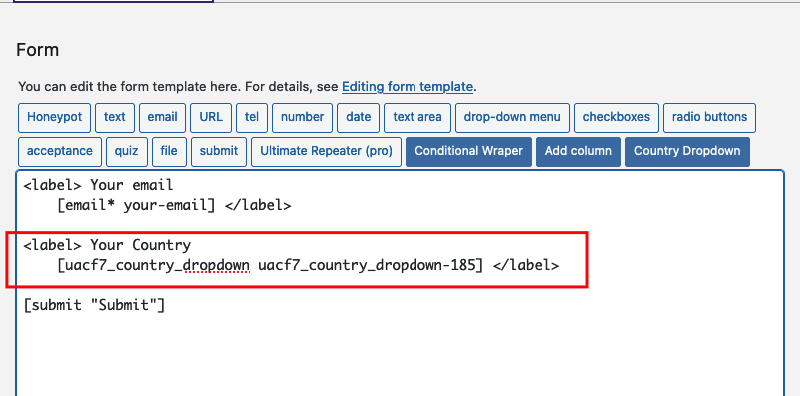
Click the "Insert Tag" button, and the tag will be added to your editing panel.
### Add other fields (if needed)
We are almost done. You can add additional fields like name, email, or URL as needed.
### **Mail Setup**
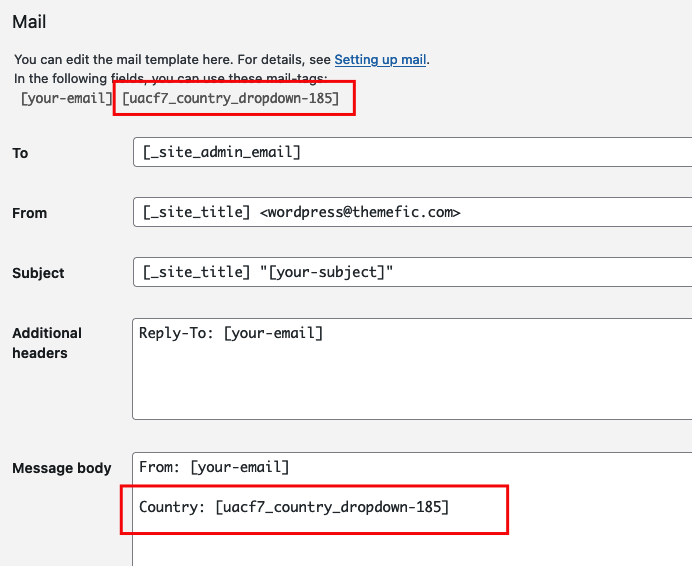
After adding all the necessary fields, ensure you properly set up the mail tags to receive the country information via email:
- Click the **Mail** tab in the form editor.
- Enter the email address where you want to receive submissions in the "To" box.
- Copy the Country Dropdown Tag from the suggested mail tags and place it inside the message body.
- Make sure to include tags for all other fields as well.
### **Copy the Shortcode**
Your form is now ready. Click "Save" and copy the Contact Form shortcode.

### Time to Publish
Paste the shortcode into your desired Pages, Posts, Custom Post Types, or Sidebars. The result should look like the example form above.
## Looking for Autocomplete Country, City, State, Zip Fields?
UACF7 Pro version's [Autocomplete Addon](https://themefic.com/docs/uacf7/pro-addons/contact-form-7-autocomplete/) allows you to set IP Geolocation-based Country, City, State, and Zip fields on Contact Form 7. These fields will automatically complete based on the user's IP address. You can also select specific countries and set a default country in the dropdown. Check out our [live demo](https://cf7addons.com/preview/contact-form-7-autocomplete/) to see this feature in action.
---
## Full Form Code
Here is a sample code of our above form:
```php
[submit "Submit"]
```
---
**Still Not Clear?** Please contact us. If you are a free User, you can open a ticket from [here](https://portal.themefic.com/support/). If you are a pro user, you can open a ticket from [here](https://portal.themefic.com/my-account/support-tickets/#/).